Notification
简介
通知是指 Android 在应用的界面之外显示的消息,旨在向用户提供提醒、来自他人的通信信息或应用中的其他实时信息。用户可以点按通知来打开应用,也可以直接在通知中执行某项操作。
在本章里将会讲解三种基本通知方式与一些兼容处理问题
创建基本通知
//通道id,下面代码会用上
String channelId = "100";

//设置点击后的内容
Intent intent = new Intent(Intent.ACTION_VIEW, Uri.parse("https://www.baidu.com"));
PendingIntent pendingIntent = PendingIntent.getActivity(this, 0, intent, 0);
//以前是使用Notification.Builder类来构建Notification,但随着android的更新
//为了兼容低版本,因此使用NotificationCompat.Builder类来构建Notification
NotificationCompat.Builder builder =
        //第一个参数是Context
        //第二个参数是渠道id,在8.0以上的系统是必须的,但在低版本里会被忽略
        new NotificationCompat.Builder(this, channelId)
                .setContentTitle("标题")
                .setContentText("这是显示的内容...")
                //小图标,这是必须的
                .setSmallIcon(R.drawable.ic_android_black_24dp)
                //大图标,不必须
                .setLargeIcon(BitmapFactory.decodeResource(getResources(), R.drawable.get_money))
                //设置通知点击后的操作
				.setContentIntent(pendingIntent)
                //通知时间,使用NotificationCompat.Builder会自动的添加时间参数
                //但我们可以手动改,比如说把时间改成1970年
                .setWhen(System.currentTimeMillis())
                //设置自动取消,点击时会自动消失
                .setAutoCancel(true)
                //通知优先级,并不必须,但为了兼容低版本,所以还是设置吧
                .setPriority(NotificationCompat.PRIORITY_DEFAULT);

//NotificationManager manager = (NotificationManager) this.getSystemService(Context.NOTIFICATION_SERVICE);
//获取NotificationManager,上面是不使用兼容的版本的类,我们这里使用兼容版本的类
NotificationManagerCompat manager = NotificationManagerCompat.from(this);
//显示Notification
manager.notify((int) System.currentTimeMillis(), builder.build());
以上代码可以直接在android8.0(API 26)以下的版本运行,但无法在android8.0及以上的系统运行,因为在android8.0以上的系统发布通知必须创建渠道并设置渠道的重要程度
创建渠道
String channelName = "普通通知";
String description = "这是个普通通知的渠道";

if (Build.VERSION.SDK_INT >= Build.VERSION_CODES.O) {
    //创建渠道
    //第一个参数是渠道id,id是String类型的,不建议太长,太长可能被截断
    //第二个参数是渠道名字,是CharSequence类型的,也是不建议长太,太长可能被截断
    //第三个参数是渠道重要性,int类型,有以下几个参数
    //IMPORTANCE_MIN        最低优先级,没有通知声音也不会出现在状态栏上
    //IMPORTANCE_LOW        没有通知声音但通知栏有通知
    //IMPORTANCE_DEFAULT    发出通知声音并且通知栏有通知,无法显示横幅
    //IMPORTANCE_HIGH       发出通知声音并显示为提示通知,能显示横幅
    //IMPORTANCE_MAX        没有使用
    NotificationChannel channel = new NotificationChannel(channelId,channelName,NotificationManager.IMPORTANCE_DEFAULT);
    //设置渠道描述,描述这个渠道是用来干嘛的,不能太长,不然会被截断
    channel.setDescription(description);
    //创建渠道
    NotificationManagerCompat.from(this).createNotificationChannel(channel);
}
上面的代码应该放到发布通知前调用,此外这段代码可以反复调用,因为创建现有通知渠道不会执行任何操作。
下面是完整代码
private void showOrdinary() {

    String channelId = "100";
    String channelName = "普通通知";
    String description = "这是个普通通知的渠道";

    //设置转跳intetn
    Intent intent = new Intent(Intent.ACTION_VIEW, Uri.parse("https://www.baidu.com"));
    PendingIntent pendingIntent = PendingIntent.getActivity(this, 0, intent, 0);

    NotificationCompat.Builder builder =
            //第一个参数是Context,第二个参数是渠道id,在8.0以上的系统是必须的
            new NotificationCompat.Builder(this, channelId)
                    .setContentIntent(pendingIntent)
                    .setContentTitle("标题")
                    .setContentText("这是显示的内容")
                    .setSmallIcon(R.drawable.ic_android_black_24dp)//小图标,必须
                    .setLargeIcon(BitmapFactory.decodeResource(getResources(), R.drawable.get_money))//大图标,不必须
                    .setWhen(System.currentTimeMillis()) //时间
                    .setAutoCancel(true)    //自动取消
                    .setPriority(NotificationCompat.PRIORITY_DEFAULT);//通知优先级

    if (Build.VERSION.SDK_INT >= Build.VERSION_CODES.O) {
        //创建渠道
        NotificationChannel channel = new NotificationChannel(channelId, channelName, NotificationManager.IMPORTANCE_DEFAULT);
        //设置渠道描述,描述这个渠道是用来干嘛的,不能太长,不然会被截断
        channel.setDescription(description);
        //创建渠道
        NotificationManagerCompat.from(this).createNotificationChannel(channel);
    }

    NotificationManagerCompat manager = NotificationManagerCompat.from(this);
    manager.notify((int) System.currentTimeMillis(), builder.build());
}
创建渠道的代码可以提取出来放到一个方法里重复使用
创建折叠式通知
在默认情况下,通知只会显示一行的信息,超过一行的信息会被省略,如果想让通知显示全部的信息,那需要用上
setStyle()
private void showFold() {
    String channelId = "200";
    String channelName = "折叠通知";
    String description = "这是个折叠通知的渠道";

    NotificationCompat.Builder builder = new NotificationCompat.Builder(this, channelId)
            .setSmallIcon(R.drawable.ic_android_black_24dp)
            .setContentTitle("你知道吗?这是个展开式Notification")
            .setContentText("你知道吗")//有些系统在视图收缩时会显示此项内容,有的则不会
            //设置样式
            //使用兼容库NotificationCompat里的大文本样式BigTextStyle
            .setStyle(new NotificationCompat.BigTextStyle()
                    .bigText("这是一个超级~~~~~~~~~~~~~~~~~~~~~~~~~~~~~~~~~~~~~~~~~~~~~~~~~~~~~~~~~~~~~~~~~~~~~~~~~~~~~~~~~~~~~~~~~~~~~~~~~~~长的文本"))
            .setAutoCancel(true)
            .setPriority(NotificationCompat.PRIORITY_LOW);

    if (Build.VERSION.SDK_INT >= Build.VERSION_CODES.O) {
        NotificationChannel channel = new NotificationChannel(channelId, channelName, NotificationManager.IMPORTANCE_DEFAULT);
        channel.setDescription(description);
        NotificationManagerCompat.from(this).createNotificationChannel(channel);
    }

    NotificationManager manager = (NotificationManager) getSystemService(Context.NOTIFICATION_SERVICE);
    manager.notify((int) System.currentTimeMillis(), builder.build());
}
折叠通知在收缩时显示的内容在不同的系统不同版本里是不一样的,在android 10的虚拟机里,收缩时显示的是
setStyle(new NotificationCompat.BigTextStyle().bigText())
setContentText()
有时候会显示全部的内容,那请你检查一下对应通知是否已展开
创建提醒式(悬挂式)通知
这个通知类型微信接受信息一样,会从顶部弹出横幅,这种通知在Google官方文档里说明提醒式通知,但在我们有时候会被称为悬挂式通知,不过都一样,都会在顶部弹出横幅。
提醒式通知官方文档里的说明是
用户的 Activity 处于全屏模式(应用使用 fullScreenIntent)。
通知的优先级很高,且在搭载 Android 7.1(API 级别 25)及更低版本的设备上使用铃声或振动。
在搭载 Android 8.0(API 级别 26)及更高版本的设备上,通知渠道的重要程度比较高。
android5.0以上的系统才有提醒式通知
介于这三点,我们来编写代码
 //设置点击后的操作
 //NotificationActivity.class是当前的类,你们可以根据自身项目的情况来改
 Intent intent = new Intent(this, NotificationActivity.class);
 PendingIntent pendingIntent = PendingIntent.getActivity(this, 0, intent,0);

 NotificationCompat.Builder builder = new NotificationCompat.Builder(this, channelId)
         .setSmallIcon(R.drawable.ic_android_black_24dp)
         .setContentTitle("警告,这有个紧急通知")
         .setContentText("通知内容是...")
         .setAutoCancel(true)
         //设置优先级为最高,这是为了兼容8.0以下的系统
         .setPriority(NotificationCompat.PRIORITY_MAX)
         .setContentIntent(pendingIntent)
         //显示横幅
         .setFullScreenIntent(pendingIntent, true);
 NotificationManagerCompat.from(this).notify((int) System.currentTimeMillis(), builder.build());
这里是使用
setFullScreenIntent()
setFullScreenIntent()
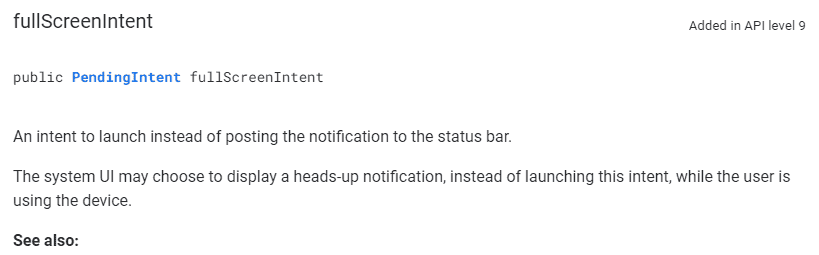
google翻译过来就是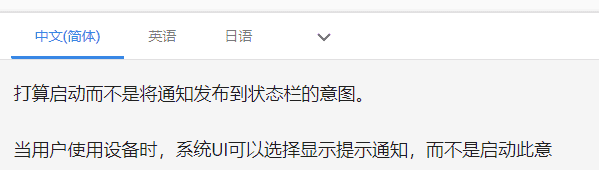
简单来说就是:
当用户不使用设备时,直接启动PendingIntent当用户使用设备,系统UI可能会选择显示提示通知,而不直接启动PendingIntent
如果再结合官方文档对显示横幅的条件,那大概只有闹钟与电话是需要使用
setFullScreenInten()
那我们应该怎么显示横幅?在8.0以上的系统还算是比较简单的了(博主真机没有8.0以上的系统,最高只有7.0,因此8.0以上的系统是虚拟机),只要设置渠道的重要程度就可以了
//创建通道,并设置重要程度为IMPORTANCE_HIGH
NotificationChannel channel = new NotificationChannel(channelId, channelName, NotificationManager.IMPORTANCE_HIGH);
当然,手动打开横幅权限也是可以的
而在7.1以上8.0以下的系统,则需要设置使用铃声或振动,出于方便,所以我们都使用
//同时使用铃声,振动与通知灯,使用振动需要权限
setDefaults(NotificationCompat.DEFAULT_ALL);
因为没有7.1以上的真机,所以博主也没试过,如果有朋友试过可行麻烦和博主说一下,让博主更新
完整代码
private void showSuspension() {

    String channelId = "300";
    String channelName = "提醒式通知";
    String description = "这是个提醒式通知的渠道";

    //设置点击后的操作
    Intent intent = new Intent(this, NotificationActivity.class);
    PendingIntent pendingIntent = PendingIntent.getActivity(this, request++, intent, PendingIntent.FLAG_ONE_SHOT);

    NotificationCompat.Builder builder = new NotificationCompat.Builder(this, channelId)
            .setSmallIcon(R.drawable.ic_android_black_24dp)
            .setContentTitle("警告,这有个紧急通知")
            .setContentText("通知内容是...")
            .setAutoCancel(true)
            //兼容低版本,设置优先级为MAX
            .setPriority(NotificationCompat.PRIORITY_MAX)
            //兼容低版本,设置默认使用铃声与振动
            .setDefaults(NotificationCompat.DEFAULT_ALL)
            .setContentIntent(pendingIntent);

    if (Build.VERSION.SDK_INT >= Build.VERSION_CODES.O) {
        //创建通道,并设置重要程度为IMPORTANCE_HIGH
        NotificationChannel channel = new NotificationChannel(channelId, channelName, NotificationManager.IMPORTANCE_HIGH);
        channel.setDescription(description);
        NotificationManagerCompat.from(this).createNotificationChannel(channel);
    }

    NotificationManagerCompat.from(this).notify((int) System.currentTimeMillis(), builder.build());
}
这样,在android8.0以上的手机就能实现横幅,至少在虚拟机里运行完全没问题。
如果横幅或通知权限被关了那只能引导用户手动打开
但问题还没有解决,因为在我国,android碎片化非常严重,并且魔改也非常严重,所以有些时候,在更低的版本里可能会出现各种各样的问题,比如默认情况下除了常用的通讯软件(如qq,微信)外,其他的软件都没有横幅权限,需要引导用户手动开启。
引导用户开启通知权限
检查是否关闭通知权限
public boolean checkNotification(@Nullable String channelId) {

    NotificationManagerCompat manager = NotificationManagerCompat.from(this);

    //版本大于等于android 8.0且channelId不为空,检查通道重要程度
    //如果重要程度不是IMPORTANCE_HIGH,那就说明横幅权限被关闭了
    if (Build.VERSION.SDK_INT >= Build.VERSION_CODES.O && channelId != null) {
        NotificationChannel channel = manager.getNotificationChannel(channelId);
        return channel == null || channel.getImportance() == NotificationManagerCompat.IMPORTANCE_HIGH;
    }

    //判断是否有关闭通知,android 8.0以下只能判断是不是关闭通知权限
    //如果系统版本低于android 19,那返回的永远是true
    return manager.areNotificationsEnabled();

}
引导用户开启通知权限
public void toSettingPage() {
    try {
        Intent intent = new Intent();
        //8.0以上的系统
        if (Build.VERSION.SDK_INT >= Build.VERSION_CODES.O) {
            intent.setAction(Settings.ACTION_APP_NOTIFICATION_SETTINGS);
            intent.putExtra(Settings.EXTRA_APP_PACKAGE, getApplicationInfo().packageName);
            intent.putExtra(Settings.EXTRA_CHANNEL_ID, getApplicationInfo().uid);

        } else if (Build.VERSION.SDK_INT >= Build.VERSION_CODES.LOLLIPOP) {//5.0以上的系统
            intent.setAction("android.settings.APP_NOTIFICATION_SETTINGS");
            intent.putExtra("app_package", getApplicationInfo().packageName);
            intent.putExtra("app_uid", getApplicationInfo().uid);

        } else {
            //低于5.0的版本
            //只能引导用户到应用设置页面
            intent.setAction(Settings.ACTION_APPLICATION_DETAILS_SETTINGS);
            Uri uri = Uri.fromParts("package", getApplicationInfo().packageName, null);
            intent.setData(uri);
        }

        startActivity(intent);
    } catch (Exception e) {
        Log.i(TAG, "toSettingPage: error");
        //出现异常直接转跳到设置页面
        Intent intent = new Intent();
        intent.setAction(Settings.ACTION_APPLICATION_DETAILS_SETTINGS);
        Uri uri = Uri.fromParts("package", getApplicationInfo().packageName, null);
        intent.setData(uri);
        startActivity(intent);
    }
}
如果有更好的方案,或者有什么问题,请和博主说一下,谢谢
参考
google官方文档:https://developer.android.google.cn/guide/topics/ui/notifiers/notifications#bar-and-drawer
© 版权声明
文章版权归作者所有,未经允许请勿转载。
相关文章





暂无评论...