
还在为WinForm项目中界面逻辑与业务逻辑耦合严重而头疼?传统的WinForm开发中,UI操作、数据验证、业务处理往往都堆积在Form的事件处理器中,导致代码难以维护和测试。今天我将分享一个革命性的解决方案——使用Fody在WinForm中实现MVVM模式,让你的代码结构更清晰,可维护性显著提升!
本文将通过完整的实战案例,带你从零开始搭建一个基于Fody的WinForm MVVM架构,包含数据绑定、属性变更通知、输入验证等核心功能。
传统WinForm开发的痛点分析
代码耦合严重
在传统WinForm开发中,我们常常看到这样的代码:
private void btnSave_Click(object sender, EventArgs e)
{
    // 界面验证
    if (string.IsNullOrEmpty(txtName.Text))
    {
        MessageBox.Show("姓名不能为空");
        return;
    }

    // 业务逻辑
    var person = new Person
    {
        Name = txtName.Text,
        Age = (int)numAge.Value
    };

    // 数据保存
    SaveToDatabase(person);

    // UI更新
    UpdateSummaryLabel();
}
问题显而易见:界面逻辑、业务验证、数据操作全部混合在一起,难以进行单元测试,代码复用性极差。
Fody + MVVM:完美的解决方案
核心优势
- 自动属性变更通知:告别手写PropertyChanged事件
- 清晰的职责分离:View负责显示,ViewModel处理逻辑
- 更好的可测试性:业务逻辑与UI完全解耦
实战:构建完整的MVVM架构
第一步:安装Fody插件
Fody
PropertyChanged.Fody
第二步:创建强劲的ViewModel
using System;
using System.Collections.Generic;
using System.Linq;
using System.Text;
using System.Threading.Tasks;
using PropertyChanged;

namespace AppFodyBasic
{
    [AddINotifyPropertyChangedInterface]
    public class PersonViewModel
    {
        // 基础属性
        public string Name { get; set; } = string.Empty;
        public int Age { get; set; } = 18;
        public string Email { get; set; } = string.Empty;
        public string Phone { get; set; } = string.Empty;
        public string Address { get; set; } = string.Empty;

        // 计算属性 - 依赖于其他属性
        [DependsOn(nameof(Name), nameof(Age), nameof(Email))]
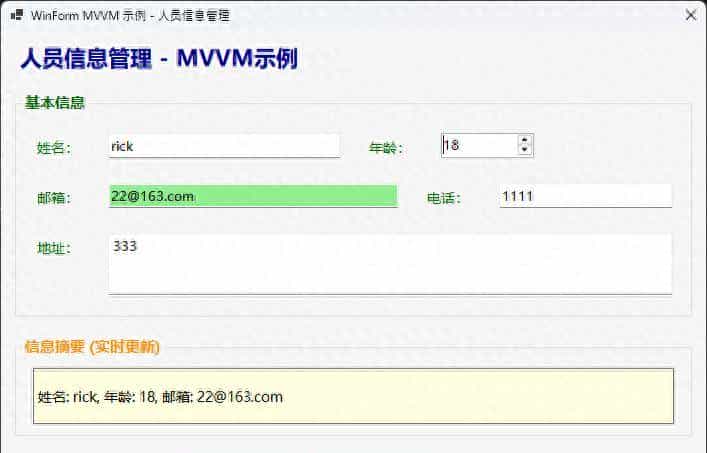
        public string Summary => $"姓名: {Name}, 年龄: {Age}, 邮箱: {Email}";

        // 验证属性
        [DependsOn(nameof(Name), nameof(Email))]
        public bool IsValid => !string.IsNullOrEmpty(Name) &&
                              !string.IsNullOrEmpty(Email) &&
                              IsValidEmail(Email);

        // 条件属性
        [DependsOn(nameof(Email))]
        public bool HasEmail => !string.IsNullOrEmpty(Email);

        // 业务逻辑方法
        public bool SavePerson()
        {
            if (!IsValid)
            {
                MessageBox.Show("请填写完整且正确的信息!", "验证失败",
                              MessageBoxButtons.OK, MessageBoxIcon.Warning);
                return false;
            }

            try
            {
                // 模拟保存到数据库
                var person = new Person
                {
                    Name = this.Name,
                    Age = this.Age,
                    Email = this.Email,
                    Phone = this.Phone,
                    Address = this.Address
                };

                // 实际业务

                return true;
            }
            catch (Exception ex)
            {
                MessageBox.Show($"保存失败: {ex.Message}", "错误",
                              MessageBoxButtons.OK, MessageBoxIcon.Error);
                return false;
            }
        }

        public void ResetPerson()
        {
            Name = string.Empty;
            Age = 18;
            Email = string.Empty;
            Phone = string.Empty;
            Address = string.Empty;
        }

        private bool IsValidEmail(string email)
        {
            try
            {
                var addr = new System.Net.Mail.MailAddress(email);
                return addr.Address == email;
            }
            catch
            {
                return false;
            }
        }
    }
}
namespace AppFodyBasic
{
    public class Person
    {
        public string Name { get; set; }
        public int Age { get; set; }
        public string Email { get; set; }
        public string Phone { get; set; }
        public string Address { get; set; }
    }
}
第三步:简洁的View层实现
using System;
using System.Collections.Generic;
using System.Linq;
using System.Text;
using System.Threading.Tasks;
using PropertyChanged;

namespace AppFodyBasic
{
    [AddINotifyPropertyChangedInterface]
    public class PersonViewModel
    {
        // 基础属性
        public string Name { get; set; } = string.Empty;
        public int Age { get; set; } = 18;
        public string Email { get; set; } = string.Empty;
        public string Phone { get; set; } = string.Empty;
        public string Address { get; set; } = string.Empty;

        // 计算属性 - 依赖于其他属性
        [DependsOn(nameof(Name), nameof(Age), nameof(Email))]
        public string Summary => $"姓名: {Name}, 年龄: {Age}, 邮箱: {Email}";

        // 验证属性
        [DependsOn(nameof(Name), nameof(Email))]
        public bool IsValid => !string.IsNullOrEmpty(Name) &&
                              !string.IsNullOrEmpty(Email) &&
                              IsValidEmail(Email);

        // 条件属性
        [DependsOn(nameof(Email))]
        public bool HasEmail => !string.IsNullOrEmpty(Email);

        // 业务逻辑方法
        public bool SavePerson()
        {
            if (!IsValid)
            {
                MessageBox.Show("请填写完整且正确的信息!", "验证失败",
                              MessageBoxButtons.OK, MessageBoxIcon.Warning);
                return false;
            }

            try
            {
                // 模拟保存到数据库
                var person = new Person
                {
                    Name = this.Name,
                    Age = this.Age,
                    Email = this.Email,
                    Phone = this.Phone,
                    Address = this.Address
                };

                // 实际业务

                return true;
            }
            catch (Exception ex)
            {
                MessageBox.Show($"保存失败: {ex.Message}", "错误",
                              MessageBoxButtons.OK, MessageBoxIcon.Error);
                return false;
            }
        }

        public void ResetPerson()
        {
            Name = string.Empty;
            Age = 18;
            Email = string.Empty;
            Phone = string.Empty;
            Address = string.Empty;
        }

        private bool IsValidEmail(string email)
        {
            try
            {
                var addr = new System.Net.Mail.MailAddress(email);
                return addr.Address == email;
            }
            catch
            {
                return false;
            }
        }
    }
}
高级应用技巧
依赖属性的妙用
使用[DependsOn]特性可以准确控制属性依赖关系:
[DependsOn(nameof(FirstName), nameof(LastName))]
public string FullName => $"{FirstName} {LastName}";

[DependsOn(nameof(Age))]
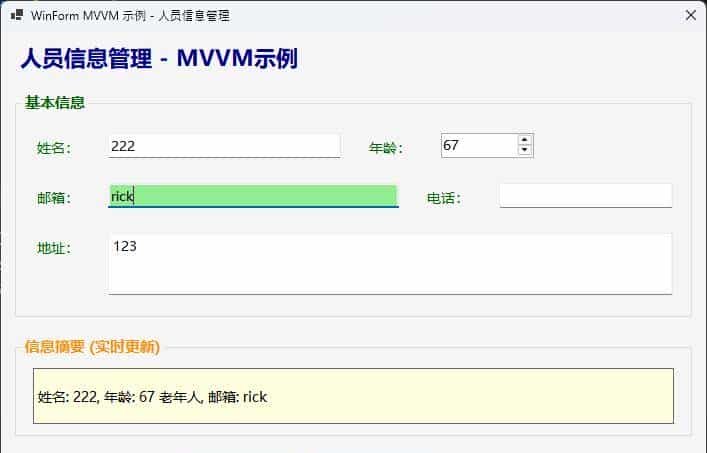
public string AgeGroup => Age < 18 ? "未成年" : Age < 60 ? "成年人" : "老年人";
常见坑点提醒
- 避免循环依赖:确保DependsOn不会形成循环引用
- 性能思考:复杂的计算属性思考使用缓存机制
- 异常处理:在ViewModel中妥善处理业务异常
// ❌ 错误示例 - 可能导致循环依赖
[DependsOn(nameof(PropertyB))]
public string PropertyA => PropertyB + "A";

[DependsOn(nameof(PropertyA))]
public string PropertyB => PropertyA + "B";

// ✅ 正确示例 - 清晰的依赖关系
[DependsOn(nameof(BaseValue))]
public string DisplayValue => FormatValue(BaseValue);
实际项目应用场景
数据录入表单
// 订单录入ViewModel示例
[AddINotifyPropertyChangedInterface]
public class OrderViewModel
{
    public string ProductName { get; set; }
    public decimal Price { get; set; }
    public int Quantity { get; set; }

    [DependsOn(nameof(Price), nameof(Quantity))]
    public decimal TotalAmount => Price * Quantity;

    [DependsOn(nameof(TotalAmount))]
    public string FormattedTotal => TotalAmount.ToString("C");
}
搜索筛选界面
[AddINotifyPropertyChangedInterface]
public class SearchViewModel
{
    public string Keyword { get; set; }
    public DateTime StartDate { get; set; }
    public DateTime EndDate { get; set; }

    [DependsOn(nameof(Keyword))]
    public bool CanSearch => !string.IsNullOrEmpty(Keyword);

    public ObservableCollection<SearchResult> Results { get; set; }
}
性能优化提议
批量属性更新
public void LoadPersonData(Person person)
{
    // 使用SuppressPropertyChangedWarnings减少通知频率
    using (PropertyChangedEventManager.SuppressNotifications())
    {
        Name = person.Name;
        Age = person.Age;
        Email = person.Email;
        // ... 其他属性
    }
    // 退出using块时会触发一次性通知
}
总结与展望
通过本文的实战演示,我们看到了Fody在WinForm MVVM开发中的强劲威力:
- 自动化程度高:告别繁琐的PropertyChanged事件编写
- 代码结构清晰:View与ViewModel职责分明,可维护性大幅提升
- ⚡ 开发效率提升:专注业务逻辑,减少样板代码
这种模式特别适合企业级应用开发,能够显著提高代码质量和团队协作效率。在实际项目中,结合依赖注入、数据访问层等技术,可以构建出超级健壮的WinForm应用程序。
技术讨论:
- 你在WinForm项目中还遇到过哪些架构设计难题?
- 对于复杂的业务验证逻辑,你更倾向于放在ViewModel还是单独的验证层?
经验分享:如果你已经在项目中应用了类似的MVVM模式,欢迎在评论区分享你的实践心得和踩过的坑!
觉得这篇文章对你有协助吗?请转发给更多需要提升WinForm开发技能的同行,让我们一起构建更优雅的C#应用程序!
#C#开发 #WinForm #MVVM #编程技巧 #Fody
© 版权声明
文章版权归作者所有,未经允许请勿转载。









没看到怎么绑定前端 view 的,而且既然用 mvvm 为什么不用 wpf ,这样用纯属增加 winform 复杂性
没啥用。又不能aot 编译
prism8.1.97应该比这强大些,这还和communicaty toolkit一个路子的吧。
我用Qt
这种第三方会被微软拖死,因为更新慢
狗屁吧,根本没什么卵用,无非就是封装了一个delegate
收藏了,感谢分享